Co-Managed IT · Oregon + Washington
Co-Managed IT Supportfor Your Internal Team
HTG's co-managed IT services and co-managed IT support take on agreed help desk work, device maintenance, vendor follow-up and onsite visits while your team keeps the responsibilities it wants to own.
What co-managed means
What are co-managed IT services?
Co-managed IT services are a support model where your team keeps the responsibilities it wants and HTG takes on an agreed part of the rest, spelled out in writing instead of assumed. It differs from staff augmentation, where a technician works inside your process, and from fully managed IT, where a provider runs the department. Most co-managed IT solutions here start the same way: your team names the gaps — overflow tickets, after-hours cover, patching, vendor chasing, onsite work — and a co-managed IT service provider takes on exactly those, nothing more.
Where a small IT team runs short
Three things that eat the week.
You have people who know the environment. What you do not have is hours.

Ticket volume
Planned work keeps getting pushed
Resets, laptop faults and printer calls arrive all day. The migration and the patch schedule wait for a quiet afternoon.
Coverage
Too much sits with one or two people
When your senior admin is out, the queue and the escalation path go too. Evenings and site visits are hard to staff.

Follow-up
Vendor chasing never closes itself
Warranty claims and repeat faults need someone to keep calling until they close, and nobody schedules that.
What HTG can take on
Co-managed IT solutions we can own outright.
Each area is agreed in writing as part of a shared IT support model, with a named responsibility and a route to an HTG engineer when something needs a specialist.
User support and escalation
- First-line help desk for the users or sites you assign
- Ticket overflow when your queue runs long
- Contracted after-hours cover for agreed hours
Device maintenance and monitoring
- Monitoring, patching and update reporting
- Microsoft 365 accounts, mailboxes and standard builds
- Endpoint protection checks and alert follow-up
Vendor coordination and onsite follow-up
- Carrier, warranty and software tickets to closure
- Onsite visits for installs, moves and hardware swaps
- Documentation and asset records kept current
Security monitoring and compliance work is scoped separately under cybersecurity services.
How the work is set up
Two ways to bring in co-managed IT support.
Both are service agreements: HTG holds the duties written into them. A technician under your direction is staff augmentation.
Defined ongoing coverage
- A fixed set of duties HTG holds each month
- A named first responder and a written escalation path
- Reviewed on a set schedule
Extra coverage around a project
- Support through a migration, opening or refresh
- Cover for leave or an open position
- Scope and end date agreed up front
Getting started
Four steps to a working co-managed IT split.
Review current workload
Your ticket history, what your team carries, what keeps slipping.
Map responsibilities and access
Who owns what today, what changes, and the access each side needs.
Agree support and escalation
Hours covered, how tickets reach us, and when work returns to you.
Transition, document and review
We take the work in stages, record it, then review on schedule.
Who does what
The split, written down.
Nothing moves to HTG by default under this co-managed IT arrangement.
Your team keeps
- Strategy, budget and vendor selection
- Business applications and internal projects
- Final say on standards and change approval
HTG can own
- The help desk queue or tier you assign
- Patching, monitoring and device builds
- Vendor tickets and onsite visits
Agreed together
- Administrative access and what each side may change
- Hours, escalation routes and after-hours cover
- Documentation and review cadence
Our case studies describe completed HTG engagements.
Coverage
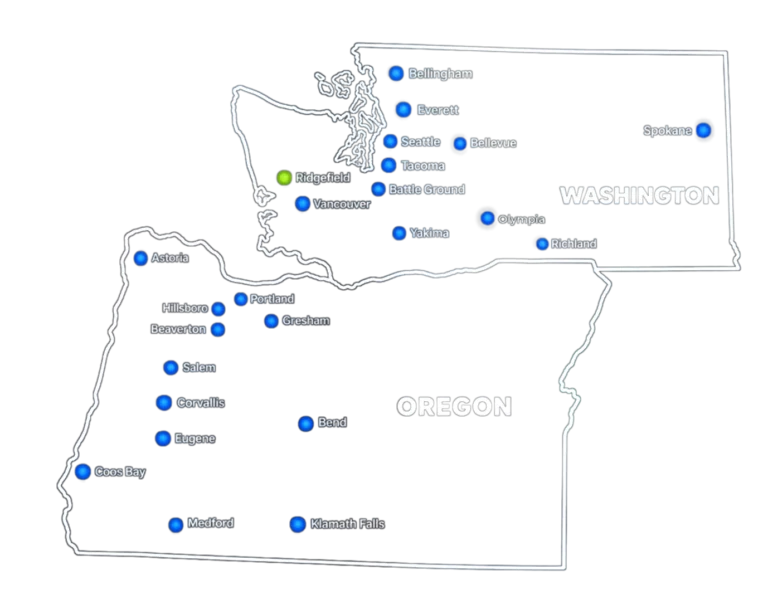
Coordinated from Ridgefield.
Our help desk and engineers deliver co-managed IT solutions from Ridgefield, Washington, so Portland, Vancouver and Southwest Washington are within driving distance.
Onsite coverage depends on address, scope, timing and availability, so we confirm it during scoping.
Picking the right fit
Choosing a co-managed IT service provider.
Look for the same things you would check on a new hire: how responsibilities and access are documented, how an escalation actually reaches a person, and whether the provider names the specific work it owns instead of a vague scope. Ask what happens when a ticket does not fit neatly into either side's list.
- A written list of what moves to the provider and what stays with your team
- A named escalation path, not a shared inbox
- Access and tooling changes agreed before anything is handed over
The same care applies when picking a co-managed IT service provider. CISA's guidance on evaluating an IT service provider covers the same ground from a security angle and is worth reading before you sign anything.
Questions we get
Co-managed IT services, answered plainly.

What is co-managed IT?
That's co-managed IT support: HTG holds an agreed part of your IT workload, and your staff keep the rest, written into the agreement so both sides know who answers each ticket.
How is it different from fully managed IT?
Fully managed means HTG runs the IT department and holds first-line support. Co-managed means your team stays in place and we cover only what you hand over. See managed IT services.
How is it different from staff augmentation?
Staff augmentation places a technician who works under your direction and your process. With a co-managed IT service provider, it's a service agreement instead: HTG holds the duties described in it and answers for how they are handled.
Can our team keep its tools and administrative control?
Usually, yes. We work in your existing tools where practical; access is agreed beforehand. Some HTG tooling may be needed for monitoring, noted during scoping.
Can HTG cover after-hours or onsite work?
After-hours cover is a contracted option for defined hours, not an open-ended promise. Onsite work near Portland and Southwest Washington is coordinated from Ridgefield, subject to availability.
What affects scope and pricing?
User and device counts, how many sites are involved, which duties move to HTG, the hours covered, and the state of documentation and access. We price after scoping, not from a list.
Does co-managed IT work for companies with multiple locations?
Yes, within the coverage we've scoped. Locations outside that range run through multi-site IT support instead, and we will tell you which model fits during scoping.
Can we start with a smaller piece of the work and expand later?
Yes. Most engagements start with one or two defined areas and grow once the split is working. Nothing moves to HTG unless agreed first.
Co-Managed Inquiry
Tell us what you want to hand over.
A first conversation covers your workload, where coverage runs thin and which co-managed IT solutions would fit. Tell us how many users you support and the work you have in mind.
This sends an inquiry, it does not book a meeting. If you would rather pick a time, book a slot on our contact page, or call 360.567.0869.