Managed IT Support from a Portland + Washington MSP
Managed IT Services. HTG Owns the Day-to-Day.
HTG provides managed IT services and support for businesses in Vancouver, the Portland metro, and across Washington and Oregon. As your managed services provider, we handle users, devices, Microsoft 365, vendors and onsite escalation through one accountable support path.
Managed IT Support
Support breaks at the handoff.
Most companies call HTG once the ticket is open but nobody owns the outcome.

Help desk
Stuck between providers
The carrier points at the firewall. The vendor points at the workstation. HTG stays on it until service is back.

Ownership
Internal IT doing two jobs
When ticket work lands on the people who own projects and budgets, both jobs suffer. So HTG takes the agreed day-to-day off their plate.

Stability
The same problem returns
A fix that holds for a month is not a fix, so repeat issues get tracked to a cause and closed out.
What HTG Manages
What our managed IT services include.
Managed IT services means a provider takes ongoing responsibility for agreed parts of your IT operation, not one ticket at a time. HTG's scope is written down before it starts.
People and access
- Help desk for users, email and apps
- Microsoft 365, accounts and licensing
- Onboarding, offboarding and access changes
Devices and maintenance
- Workstation and laptop support
- Monitoring, patching and device health
- Backup checks and security escalation
Vendors and operations
- Carrier, software and warranty escalation
- Vendor records and system dependencies
- Onsite coordination and repeat-issue follow-up
Security responsibilities included in managed IT are also defined in the agreement. Broader risk, compliance and threat-monitoring needs, meanwhile, are handled through HTG's cybersecurity services, which cover security compliance support and managed detection and response.
Your IT Team or Part of It
Fully managed or co-managed IT services.
In short, fully managed means HTG is your IT department. With co-managed IT, HTG owns a defined slice while your team keeps the rest.
Both models still hand HTG ownership of something. Either one can also include strategic guidance—budget planning, roadmap input and vendor decisions—for clients who want that layer without hiring a full-time IT director. If you would rather keep ownership and just add people to your own team, IT staff augmentation services are the other option.
HTG runs the day-to-day
- Primary help desk and escalation ownership
- Users, devices, Microsoft 365 and vendors
- Monitoring, patching, documentation and reporting
Internal IT keeps control
- Ticket overflow and contracted after-hours cover
- Shared escalation paths and documentation
- Monitoring, patching, vendors or project support
Assessment and Onboarding
Start with the environment you already have.
Moving to managed IT services doesn’t mean replacing everything on day one.
Review
Map the current support model, repeat issues, locations and vendors.
Document
Capture users, devices, Microsoft 365 and access before anything changes.
Set ownership
Then agree in writing what HTG owns and what stays internal.
Stabilize
Close the gaps we found, then watch the early ticket patterns.
When Remote Is Not Enough
Some tickets need hands, hardware or a carrier.
When a problem can’t be fixed remotely, HTG coordinates the right onsite resource for the location, the issue and what your managed IT support agreement covers.
Oregon + Washington Coverage
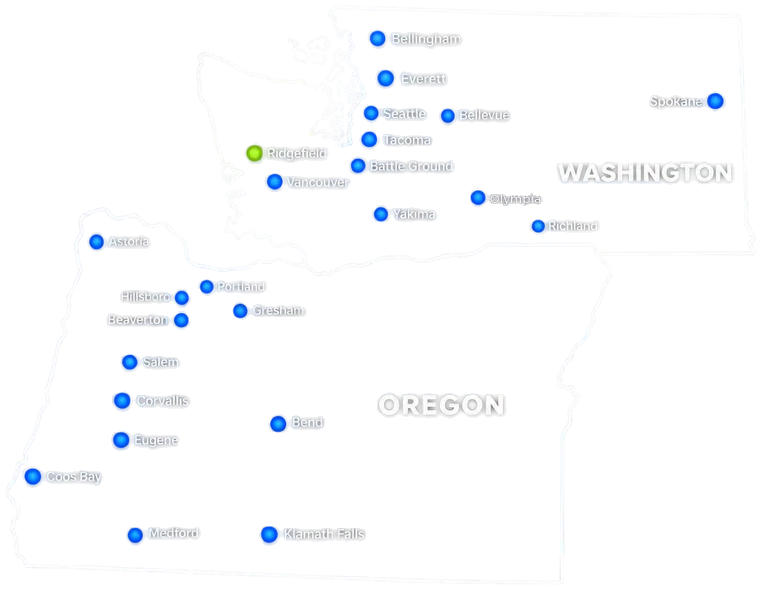
Managed IT services for Vancouver, Portland and businesses across Oregon and Washington.
HTG is a managed services provider based in Ridgefield, Washington. So most of the managed IT services we deliver day to day are for businesses in the Portland metro, Vancouver and Southwest Washington.
Outside the Portland metro, we also provide managed IT services to locations elsewhere in Oregon and Washington when the environment and support model are a fit.
Before You Choose
Questions about managed IT services.

What are managed IT services?
A provider takes ongoing responsibility for agreed parts of your IT operation rather than handling one ticket at a time. For HTG that can include help desk, Microsoft 365, devices, patching, monitoring, vendor coordination and reporting.
What is a managed services provider (MSP)?
An MSP is an outside company that runs agreed parts of your IT under a standing agreement. As a managed services provider, HTG delivers managed IT services to businesses in Portland, Vancouver and elsewhere in Oregon and Washington, either as your whole IT department or alongside the team you already have. When you compare providers, CISA guidance for evaluating managed service providers is a good starting point for what to ask about security, support levels and contracts.
How is managed IT different from break/fix support?
Break/fix starts after something fails: you call, a technician fixes that one issue, then the job is closed. With managed IT, the provider is responsible for agreed systems and support on an ongoing basis, so monitoring, patching and follow-up on repeat issues are part of the work instead of separate calls.
What is included in HTG managed IT support?
User and device support, Microsoft 365 and identity administration, onboarding and offboarding, endpoint monitoring and patching, backup verification and business continuity planning, carrier and vendor escalation, onsite coordination, documentation and reporting. Scope is set per client rather than sold as a fixed package.
What is the difference between fully managed and co-managed IT services?
Fully managed means HTG acts as the IT department, holding first-line support and escalation. Co-managed means your internal team keeps strategy and the areas it wants, while HTG owns a defined slice such as ticket overflow, after-hours cover, monitoring and patching, or vendor follow-up.
Does HTG provide after-hours or 24/7 support?
24/7 support options are available when included in the service agreement. Support hours and escalation expectations are defined in scope, so both sides know in advance what is covered.
What affects the price of managed IT services?
Users and devices, number of locations, the support hours you need, how much onsite work is expected, environment complexity, and the transition work required to get things stable. So HTG prices against scope after the assessment.
What happens during assessment and onboarding?
HTG reviews the current support model, documents the environment, agrees in writing what it owns and what stays internal, then works the early gaps. Nothing is replaced on day one, and there is also no obligation to move everything at once.
Start With the Support Problem
Bring us the work that keeps getting handed off.
Tell us what keeps coming back and where coverage runs out. Then we will come back with what HTG should own.